Dialog-Admin#
The Dialog-Admin is the central management point for all Dialog+ fields in i-doit -- i.e. dropdown fields whose selection values you can edit yourself.
These fields are used in many categories of the IT documentation. Via the Dialog-Admin you manage all values in one central location.
Overview#
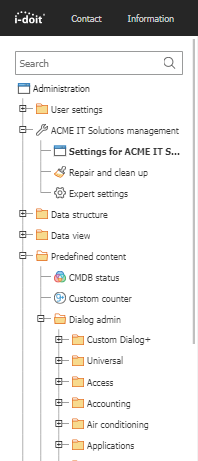
You can find the Dialog-Admin under Administration → Predefined content → Dialog-Admin. In the left navigation tree, all attributes of the Dialog+ field type are sorted alphabetically by their associated categories.
If you have created a custom category with a Dialog+ attribute, this attribute also appears in the navigation tree -- under the Custom Dialog+ section.
Viewing values#
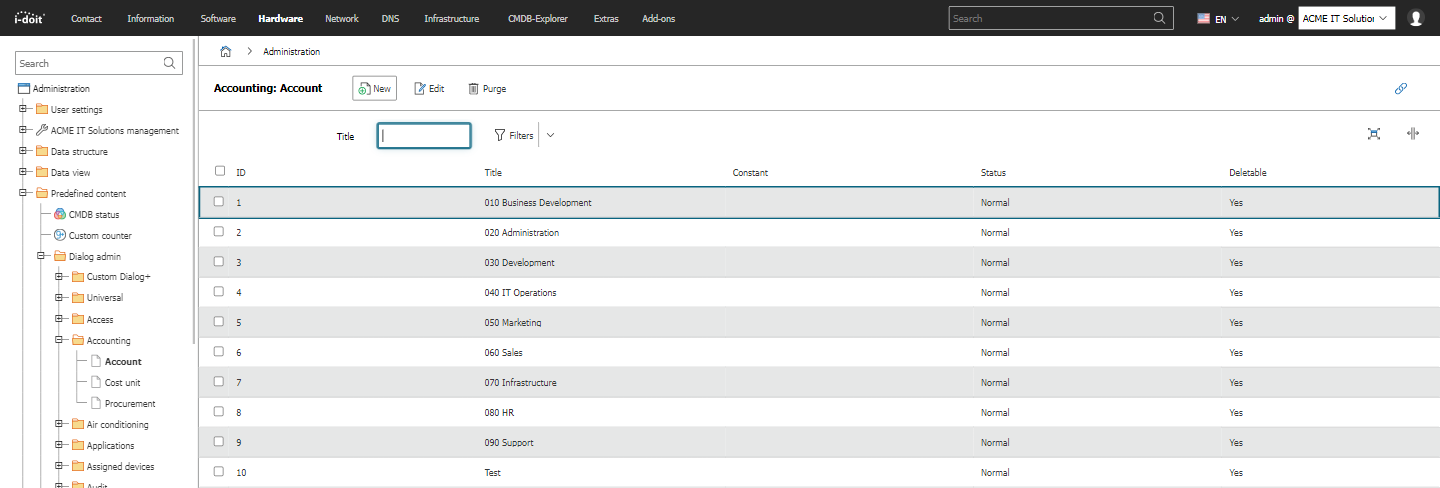
Click on an attribute in the left navigation tree to see the previously documented values in the main area.
Creating values#
To create a new value:
- Click the New button above the overview.
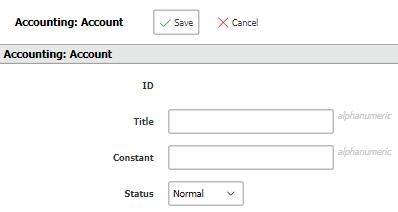
- Fill in the form:
- ID: i-doit automatically assigns a unique identifier. This is helpful, for example, when working with the API.
- Name: The value displayed in the Web GUI when you view or edit the Dialog+ attribute.
- Constant: A unique, descriptive string -- particularly helpful when using the API.
- Status: Each value has a condition. Select Normal (2) so that the value can be used in the documentation.
- Click Save.
Editing values#
To edit an existing value, click on the desired value in the overview. The form is the same as when creating.
Effects
Changes and deletions immediately affect the entire IT documentation: If you change a value in the Dialog-Admin, it changes everywhere automatically. If you delete a value, it is removed everywhere it was used. Therefore, check via a report which objects use this value before deleting. Via the list editing you can then set an alternative value for all affected objects.
Deleting values#
To delete a value:
- Check the checkbox of the value in the overview.
- Click the Purge button.
The value is irrevocably deleted. In the tabular overview you can see for each value whether it can be deleted. Some values are assumed by i-doit as given to ensure certain functionalities -- these cannot be removed.
Setting permissions#
You can assign permissions for each Dialog+ attribute per user or user group. This way you ensure that only certain groups may create, change or delete values, while other groups can only use the values.