cmdb.external#
The integration of external data sources into the Configuration Management Database (CMDB) can be simplified through various measures. First, it is important that the data is available in a standardized, easy-to-process format to facilitate reading and transferring it into the CMDB. Furthermore, functions should be implemented that enable a complete, one-time data transfer as well as regular, automated synchronizations. It is crucial that each data element in the CMDB is linked to its origin to ensure the identifiability of data sources. At the same time, clear rules and guidelines must be defined to delineate the scope of data from individual sources. The simultaneous integration of multiple data sources should also be supported, with conflicts and inconsistencies being detected and resolved. Finally, single-request operations should be implemented that allow users to perform data imports, synchronizations, and queries through a single interface to increase usability and efficiency.
cmdb.external#
What are External Identifiers?#
- User-defined string-based stable and unique IDs
- Composed of a "type" and an "id"
For example my_vendor_id / my_object_id.
Why do we need External Identifiers?#
- Clear identification of object and category records
- Scoping: Isolated data areas
- Caller does not need to know internal record IDs
How do External Identifiers work?#
- Hierarchical approach
- User defines an External Identifier for the object
- extType: Identifier for the data source/vendor
- extId: Identifier for the object
- User also defines an Identifier (without extType) for each category entry
- API creates a mapping between identifier and internal IDs
Examples would be:
- External identifier for an object
datasource-1 / windows-server100
- External identifier for each category entry
datasource-1 / windows-server100 / C__CATG__CPU / intel-1
On the first level is the object. Here we define the extType and the extId. Together they form the complete identifier and uniquely identify the created object.
On the next level we have our Category level. Each category starts with the associated constant and receives a unique ID on the level below.
From this structure, i-doit then automatically derives the final identifier, illustrated here using the example of intel-1 and intel-2.
Here is an example push request for creating an object via the new endpoint.
1 2 3 4 5 6 7 8 9 10 11 12 13 14 15 16 17 18 19 20 21 22 23 24 25 26 27 28 29 30 31 32 33 34 35 36 37 | |
and records everything in an internal mapping table.

Scoping#
Scoping ensures that two data sources do not interfere with each other, as we assume the following:
If different data sources simultaneously feed their data into i-doit, we assume that each data source is authoritative on its own and can be considered a Single Source of Truth. Conversely, this means that an object can never appear in multiple data sources simultaneously.
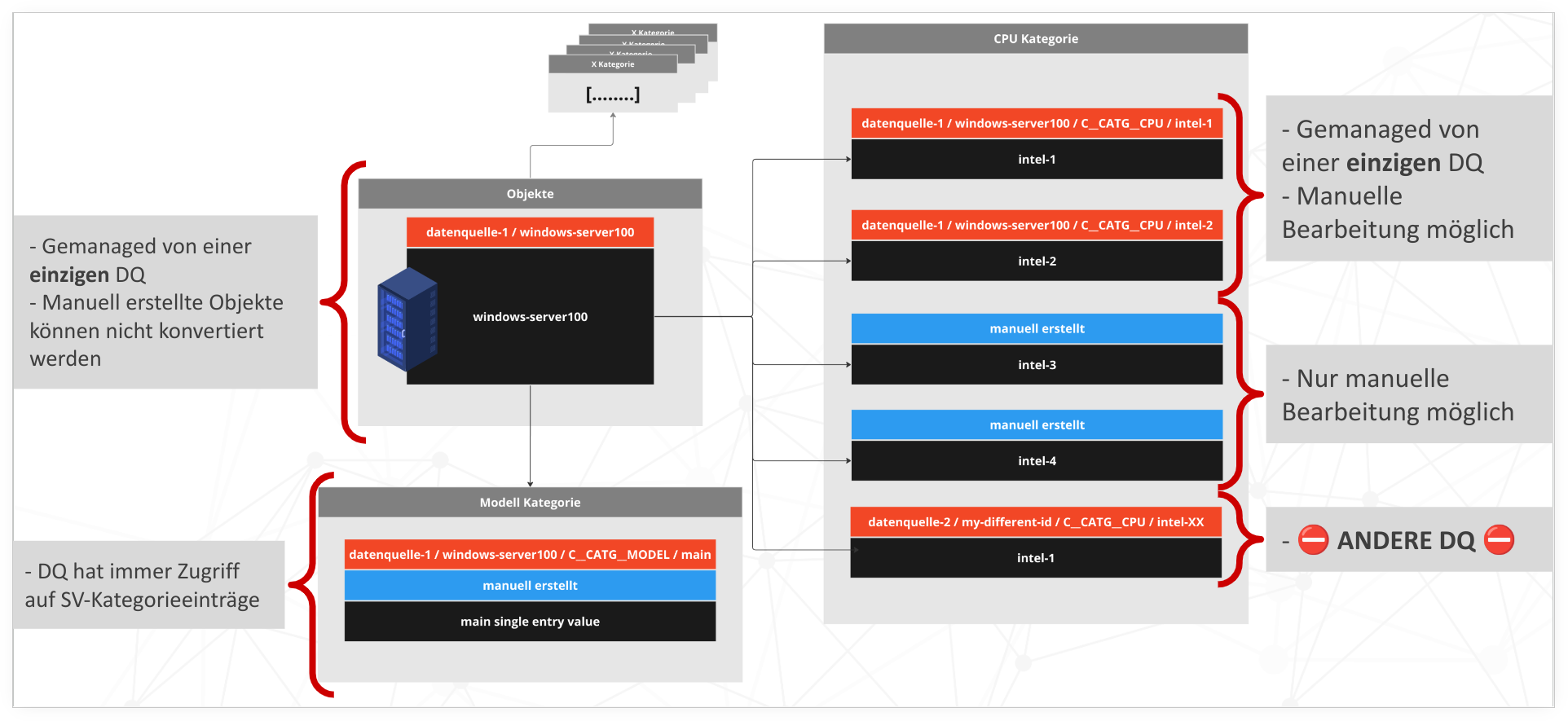
Based on this assumption, i-doit implements the following safety net:
- There is a clear assignment of objects to data sources
- An object can only be assigned to one data source
- A data-source object cannot be managed by multiple data sources
- Another subtlety: Existing objects cannot be manually assigned to a data source
- An object can only be assigned to one data source
At the category level, we have a similar handling:
- Clear assignment of category entries to data sources
- A special case for MV: MV entries can be manually edited even if they originate from a data source
- The reverse, however, is that manually created multi-value category entries remain protected from data source access
- But here too there is an exception, namely for single-value categories: Manually created single-value category entries can be manipulated by data sources
- In the bottom right there is also a prohibited and non-representable case: The data source "datasource-2" cannot have a CPU entry in an object that is managed by "datasource-1"
cmdb.external.push.v2#
Creation and updating of objects and category entries through a single request. Additionally, various "strategies" allow us to represent different use cases, although it should be mentioned that these are only located at the category layer.
Furthermore, the Push API also has procedures to convert human-readable values into their technical representation, for example Dialog+, object references or category references. And most importantly:
By using the Push API, you do not have to forgo general CMDB structures, such as the permission system, validation rules or the logbook. Everything works as before!
| Strategy | entry exists single-value | entry exists multi-value | entry does not exist single-value | entry does not exist multi-value |
|---|---|---|---|---|
| create | is skipped | is skipped | is created | is created |
| update | is updated | is updated | is created | is created |
| overwrite | is updated | is updated | is created | is created |
overwrite deletes all multi-value entries from i-doit that are not included in the request. Existing ones are updated or created.
Request parameters#
| Key | JSON data type | Required | Description |
|---|---|---|---|
| extType | String | Yes | Data source, for example: datasource-1 |
| extId | String | Yes | Object, for example: windows-server100 |
| class | String | Yes | Object type, for example: C__OBJTYPE__SERVER |
| title | String | Yes | Object title, for example: Server 100 |
| data | Object | Yes | Category data, keyed by category constant (see the examples below) |
Example#
1 2 3 4 5 6 7 8 9 10 11 12 13 14 15 16 17 18 19 20 21 22 23 24 25 26 27 28 29 30 31 32 33 34 35 36 37 38 39 40 41 42 43 44 45 46 47 48 49 50 51 52 53 54 55 56 57 58 59 60 61 62 | |
1 2 3 4 5 6 7 8 9 10 11 12 13 14 15 16 17 18 19 20 21 22 23 24 25 26 27 28 29 30 31 32 33 34 35 36 37 38 39 40 41 42 43 44 45 46 47 48 49 50 51 52 53 54 55 56 57 58 59 60 61 62 63 64 65 66 67 68 69 70 71 72 73 74 75 76 77 78 79 80 81 82 83 84 85 86 87 88 89 90 91 92 93 94 95 96 97 98 99 100 101 102 103 104 105 106 107 108 109 110 111 112 113 114 115 116 117 118 119 120 121 122 123 124 125 126 127 128 129 130 131 132 133 134 135 136 137 138 139 140 141 142 143 144 | |
cmdb.external.pull.v2#
Reading CMDB data based on the "External Identifier". With pull, the External Identifier determines the queried data, for example:
| extType | extId | Action |
|---|---|---|
| datasource-1 | null | Reads all objects and all category data |
| datasource-1 | windows-server100 | Reads windows100 and all category data |
| datasource-1 / windows-server100 / C__CATG__CPU | null | Reads windows100 and all CPU entries |
| datasource-1 / windows-server100 / C__CATG__CPU | intel-1 | Reads windows100 and only the CPU entry intel-1 |
Request parameters#
| Key | JSON data type | Required | Description |
|---|---|---|---|
| extType | String | Yes | Data source, for example: datasource-1 |
| extId | String | No | Object, for example: windows-server100. If omitted, all objects of the data source are read |
Example#
1 2 3 4 5 6 7 8 9 10 | |
1 2 3 4 5 6 7 8 9 10 11 12 13 14 15 16 17 18 19 20 21 22 23 24 25 26 27 28 29 30 31 32 33 34 35 36 37 38 39 40 41 42 43 44 45 46 47 48 49 50 51 52 53 54 55 56 57 58 59 60 61 62 63 64 65 66 67 68 69 70 71 72 73 74 75 76 77 78 79 80 81 82 83 84 85 86 87 88 89 90 91 92 93 94 95 96 97 98 99 100 101 102 103 104 105 106 107 108 109 110 111 112 113 114 115 116 117 118 119 120 121 122 123 124 125 126 127 128 129 130 131 132 133 134 135 136 137 138 139 140 141 142 143 144 145 146 147 148 149 150 151 152 153 154 155 156 157 158 159 160 161 162 163 164 165 166 | |
Use cases#
The following examples follow a typical flow: an external system (here datasource-1) keeps its own IDs and mirrors data into i-doit. Note that objectId is a number without quotes, and the JSON-RPC id field belongs at the top level of the request, not inside params.
Connect an existing object to an external identifier#
You already have the object in i-doit and want to tie it to the ID from your external system, so you can add data to it later. This is done with cmdb.external.link.v2.
| Key | JSON data type | Required | Description |
|---|---|---|---|
| extType | String | Yes | Data source, for example: datasource-1 |
| extId | String | Yes | External identifier for the object, for example: windows-server100 |
| objectId | Number | Yes | Internal ID of the existing i-doit object, for example: 770 |
cmdb.external.link.v2
Request
1 2 3 4 5 6 7 8 9 10 11 | |
1 2 3 4 5 6 7 | |
If the object is already connected to this identifier, you get success: true together with the message External identifier is already linked to given object.. That response already confirms the mapping, so you do not need a separate pull to check it.
Add data to a connected object#
The object is connected, now you write data from your external system into one of its categories. Under data, each category holds one identifier per entry, and the actual fields sit below that identifier.
cmdb.external.push.v2 (one category)
Request
1 2 3 4 5 6 7 8 9 10 11 12 13 14 15 16 17 18 19 20 21 22 23 | |
1 2 3 4 5 6 7 8 9 10 11 12 13 14 15 16 17 18 19 | |
Create an object and fill it in one call#
The object does not exist yet, so you create it and fill it in a single cmdb.external.push.v2 call. The object level (extType, extId, title, class) and the category level (data) are sent together.
cmdb.external.push.v2 (create object)
Request
1 2 3 4 5 6 7 8 9 10 11 12 13 14 15 16 17 18 19 20 21 22 23 24 25 26 | |
1 2 3 4 5 6 7 8 9 10 11 12 13 14 15 16 17 18 19 | |
Look up what is connected to an identifier#
You want to see what is behind an identifier and how its data looks. cmdb.external.pull.v2 reads by identifier, and how much you get back depends on which part of the identifier you send:
| extType | extId | Reads |
|---|---|---|
| datasource-1 | null | all objects and all category data |
| datasource-1 | windows-server100 | that object and all its category data |
| datasource-1 / windows-server100 / C__CATG__CPU | null | that object and all CPU entries |
| datasource-1 / windows-server100 / C__CATG__CPU | intel-1 | that object and only the CPU entry intel-1 |
cmdb.external.pull.v2
Request
1 2 3 4 5 6 7 8 9 10 | |
1 2 3 4 5 6 7 8 9 10 11 12 13 14 15 16 17 18 19 20 21 22 23 24 25 26 27 28 29 30 31 32 | |