Reports in the ISMS Add-on#
This page describes the evaluations provided with the ISMS add-on in i-doit. For a general introduction to reports and where to find them in i-doit, see the Report Manager.
Quick Overview
- The add-on ships one variable report and nine report views of type ISMS.
- All contents are designed so you can quickly filter and customize them in practice.
- When the option is activated, views can be filtered by location rights (see Optionally Settings in the configuration).
Installed Reports and Views (Overview)#
| Type | Name | Purpose | Key Filters/Interactions |
|---|---|---|---|
| Variable Report | ISMS Risk Assessment (Group) | Shows risk assessments of all object groups to which the object is assigned that was used to invoke the report; freely customizable in the query editor. | Bound to the object type category "ISMS Risk Assessment (Group)"; can be duplicated and customized (e.g. for service components). |
| Report View | ISMS Risk by Risk Class | Lists objects/object groups with risk assessments when the implementation status is "Unprocessed". | Filters: Risk Class, Scope, Location (location filter). |
| Report View | Statement of Applicability (SoA) | Structured view of all Annex A measures (if available) by chapters/subchapters including applicability, justification, and implementation status; shows assigned SoA measures below each Annex A measure. | Considers location rights (if activated). |
| Report View | SoA Completeness Check | Like the SoA statement, additionally with color-coded indication of whether measures are sufficiently documented. | Considers location rights (if activated). |
| Report View | ISMS Risk Matrix | Matrix before and after risk treatment; axes from the defined assessment criteria. | Clicking a cell opens the filtered ISMS Risk Assessment; Filters: Scope, Location. |
| Report View | ISMS Risk Assessment | Complete detailed view of all risk assessments (IDs, object, threat, vulnerability, owner, evaluations, impacts, probability of occurrence, risk level, measures, treatment, responsible persons, resources, deadlines, prioritization, values after treatment, residual risk). | Filters: Scope, Location. |
| Report View | ISMS Risk Treatment Plan (RTP) | Focus on risk treatment according to ISO 31000: threat -> affected objects -> measures; including justification, risk owner, urgency, latest implementation date. | Filters: Scope, Location. |
| Report View | ISMS Scope | Shows all objects (with object type and location) whose ISMS relevance = "Yes". | Filters: Scope, Location. |
| Report View | ISMS Risk Assessment (object-based) | Like "ISMS Risk Assessment", additionally filterable by individual objects; offers CSV export. | Object filter; CSV export. |
| Report View | ISMS Residual Risk by Level | Analogous display to "ISMS Risk by Level", but after measures (residual risk). | - |
Details and Best Practices#
Variable Report: ISMS Risk Assessment (Group)#
Purpose. Risk assessments of all object groups for the currently selected object. Ideal for quickly overviewing group-based risks.
Customizability. The report is freely editable in the query editor. A typical pattern is duplication for service components: Create "ISMS Risk Assessment (Service Component)" and adjust the condition:
- Select the category "Service Components (Service)"
- Set the "Assigned Object" attribute to the field placeholder Object ID
Note
The report is bound to the custom category of the same name and can be assigned to different object types.
Report View: ISMS Risk by Risk Class#
Purpose: Overview of risk levels with implementation status = "Unprocessed".
Filters: Risk Class, Scope, and Location (location filter restricts to objects below the selected location).
Report View: Statement of Applicability (SoA)#
Purpose: Complete, hierarchical view of Annex A measures (chapters/subchapters), including applicability, justification (inclusion/exclusion), and implementation status. Assigned SoA measures are displayed below each Annex A measure; the complete list of all SoA measures follows at the end.
Rights: Considers location rights if these are activated in the tenant settings and the measures have a location.
Report View: SoA Completeness Check#
Purpose: Audit-ready overview of whether all measures are sufficiently documented (color-coded marking per measure).
Rights: Considers location rights (if activated).
Report View: ISMS Risk Matrix#
Purpose: Visualizes the risk situation before and after treatment. Axis labels are derived directly from the assessment criteria.
Interaction: Clicking on the count in a matrix cell opens the report view "ISMS Risk Assessment" filtered to the affected combination of probability of occurrence and impact.
Filters: Scope and Location.
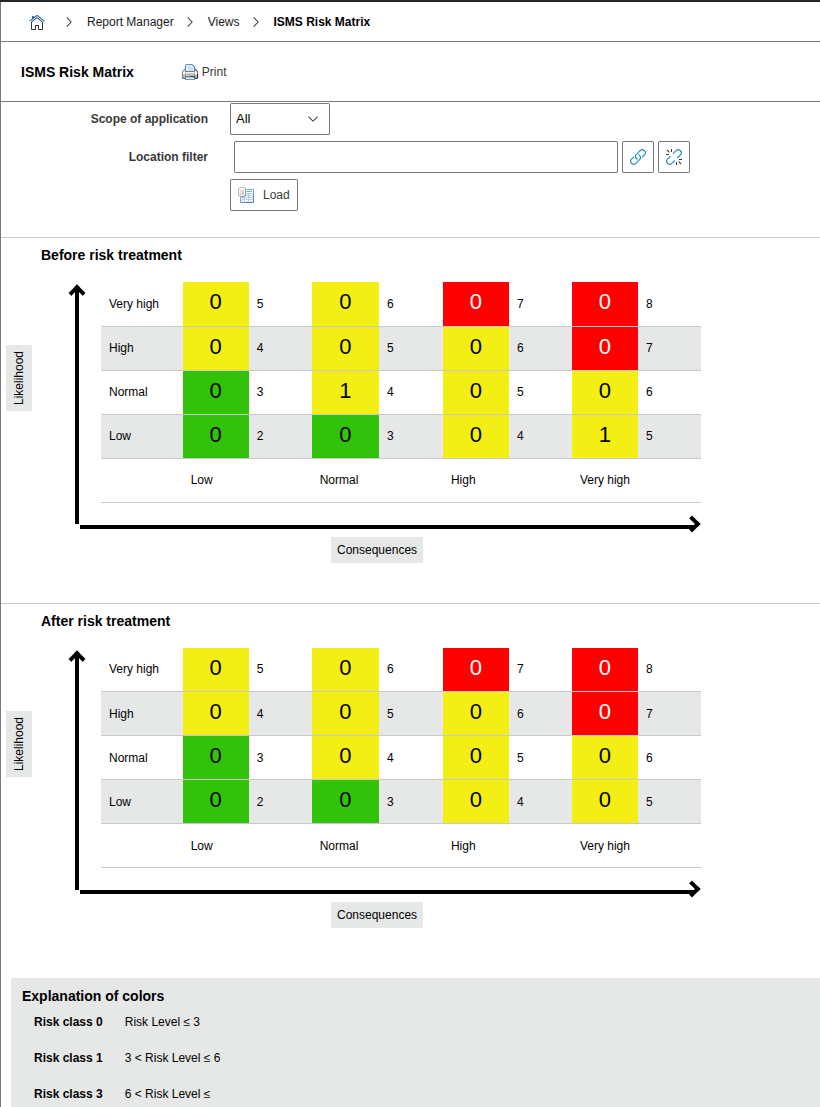
The axes and colors are derived from the assessment criteria, risk formula, and risk classes defined in the Configuration. Adjust these first so you can use the matrix effectively.
Report View: ISMS Risk Assessment#
Purpose: Complete detailed view of all risk assessments in i-doit, suitable as a work list for risk owners and auditors.
Content (excerpt): Assessment ID, affected object type/name, threat, vulnerability, value owner, risk owner, evaluations of damage scenarios and resulting impact, probability of occurrence, risk level (color-coded), existing measures, risk treatment, responsible persons, required resources, implementation date, prioritization, evaluations after treatment, and residual risk (color-coded).
Filters: Scope and Location.
Report View: ISMS Risk Treatment Plan (RTP)#
Purpose: Implementation-oriented view, mapping threats to affected objects and measures; shows risk treatment (typically values according to ISO 31000), justification, risk owner, urgency, and latest implementation date.
Filters: Scope and Location.
Report View: ISMS Scope#
Purpose: List of all objects (including object type and location) where ISMS relevance = "Yes" is set. Ideal for scope definition and audits.
Filters: Scope and Location.
Report View: ISMS Risk Assessment (object-based)#
Purpose: Focused view on individual objects with the same information as the general risk assessment.