SHD Connect
This module requires the SM-VIEW Client as a base module.
Installation#
The current version of the SHD Connect add-on can be downloaded from the following link: https://www.sm-view.de/
A list of the different versions including their changelog can be viewed at the following link: SHD Connect Modul
Once you have downloaded the add-on, you can easily upload and install it via the i-doit administration interface.
To the documentation of the add-on
Configuration#
To use the add-on, the appropriate permission must be granted. Only then will SHD Connect be visible in the add-on menu of i-doit:
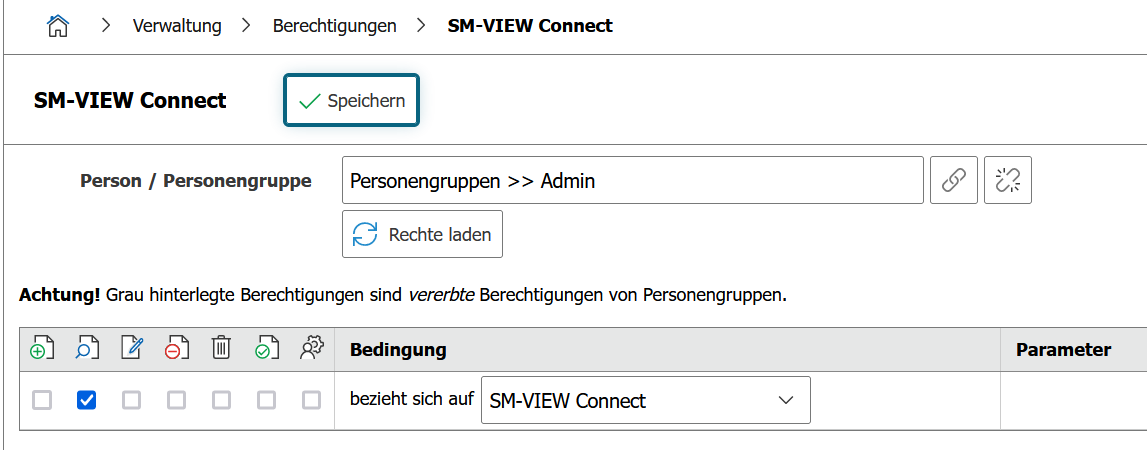
To use one or more adapters, an appropriate license is required. This license is usually provided to you by synetics as part of your license key. The prerequisite for this is the purchase of the respective adapter in the synetics marketplace.
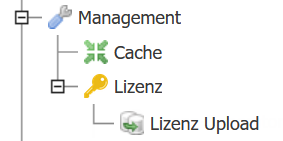
Another option is to provide the license directly from SHD. The corresponding license file can be uploaded in the management area:
Currently, the following adapters are available
- LDAP (User and Clients)
- vSphere
- Baramundi
- Telekom Contracts
- Aeneis
- macmon / Cisco as CSV import
- Azure (still in development)
Using the Adapters#
For using the adapters, the following pages with more information are available:
SHD Connect - Basics
SHD Connect - AD/LDAP Adapter
SHD Connect - Aeneis Adapter
SHD Connect - Baramundi Adapter
SHD Connect - Macmon Adapter
SHD Connect - Telekom Adapter
SHD Connect - vSphere Adapter