Workflow#
With the workflow system, you create one-time tasks and recurring checklists and assign them to responsible persons and objects. Involved persons are informed via status-based notifications.
Workflow types#
A workflow type is a template with all necessary parameters. You edit existing templates or create new ones via the administration interface.
The workflow#
A workflow describes a scheduled action -- e.g., replacing the tape medium of a backup server. Each workflow assignment must be accepted by the responsible persons. Upon completion, a status report can be submitted.
Predefined workflow types#
Work order#
A work order is a scheduled action to be performed by selectable users.
Checklist#
With checklists, you generate daily, weekly, or yearly recurring tasks. To do this, specify a periodic time sequence for the start date and select the repeat option. Recurring workflows can also be terminated on a scheduled basis.
Template parameters#
For the workflow types TASK (work order) and CHECKLIST, pre-built parameters are available. Start and end dates are created automatically. You create additional parameters as needed:
- Text
- Single-line text field
- Full text
- Multi-line text field
- Numeric
- Numeric text field
- Date
- Text field with date
- Yes / No
- Two radio buttons for selection
You freely choose the name and key of a new workflow type. The order determines the display position of the fields. Check for empty field displays an error message if a required field is empty when saving.
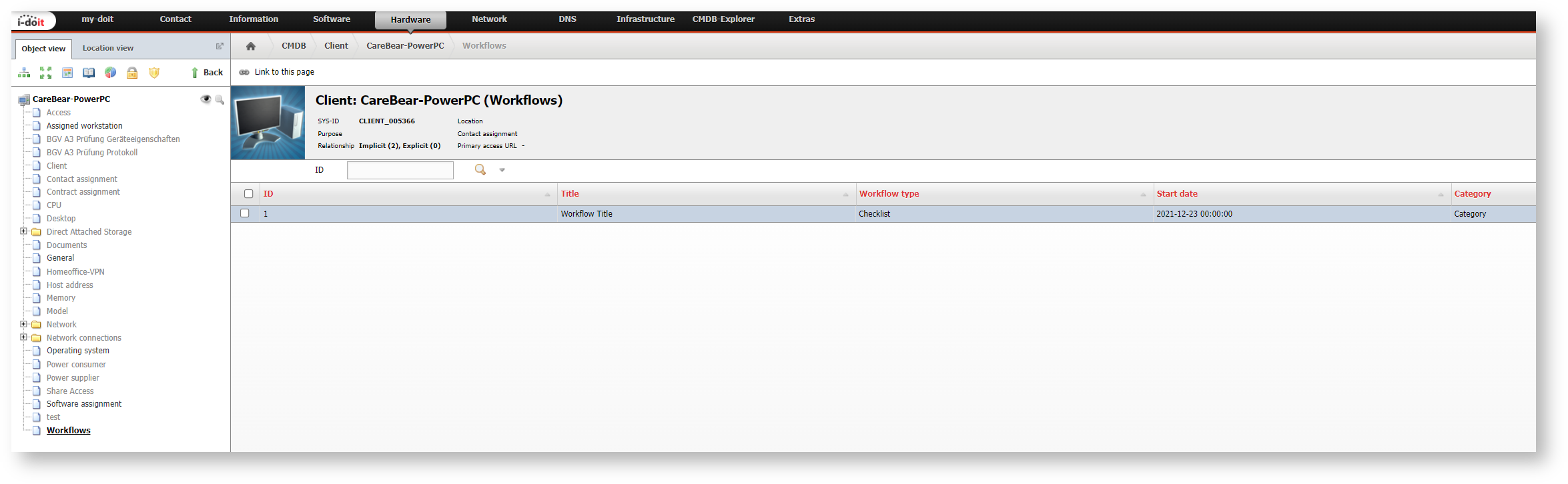
Workflows in the object#
Workflows can also be displayed in the object via the Workflows category. This must first be added via the object type configuration
CLI console commands and options#
| Command | Internal description |
|---|---|
| workflows-process | Processes all workflows, sends emails, and creates new tasks from checklists |
This command is only available after installation of the Workflow add-on.
workflows-process#
Processes all workflows, sends emails, and creates new tasks from checklists
Options:
| Parameter (short) | Parameter (long) | Description |
|---|---|---|
| -t | --types=TYPES | Workflow types (multiple values are possible) |
| -u | --user=[USERNAME] | Username of a user authorized for execution |
| -p | --password=[PASSWORD] | Password for authentication of the previously specified user |
| -i | --tenantId=[TENANT-ID] | Tenant ID of the tenant to be used (default: 1) |
| -c | --config=[CONFIG-FILE] | Specification of the path to the configuration file |
| -h | --help | Help message for displaying further information |
| -q | --quiet | Quiet mode to disable output |
| -V | --version | Display the version of the i-doit Console |
| --ansi --no-ansi | Force ANSI output (or disable with --no-ansi) | |
| -n | --no-interaction | Disables all interaction questions of the i-doit Console |
| -v / -vv / -vvv | --verbose | Increases the output verbosity. (1 = Normal output, 2 = Detailed output, 3 = Debug level) |
Usage example
1 | |
Releases#
| Version | Date | Changelog |
|---|---|---|
| 1.6 | 09.09.2025 | [Task] PHP 8.4 compatibility |
| 1.5 | 26.02.2025 | [Task] Make symfony 6.4 compatible [Task] Make Smarty 5 compatible [Bug] Workflow Checklist is inaccessible after workflow is accepted |
| 1.4 | 10.10.2024 | [Bug] Fix autoload issue during add-on installation |
| 1.3 | 09.07.2024 | [Bug] Workflow Add-on User Permissions are not available [Bug] This task is part of the following checklist link does not work [Bug] Dependent tasks are not displayed in checklists |
| 1.2 | 07.11.2023 | [Task] Use new routes to display object and object type images / move add-on related files |
| 1.1.1 | 22.08.2023 | [Improvement] PHP 8.1 Compatibility |
| 1.1 | 05.09.2022 | [Task] PHP 8.0 Compatibility [Task] Design Compatibility |
| 1.0.6 | 27.07.2022 | [Bug] Error message when a workflow is accepted [Bug] The frequency of checklists cannot be used because the value is not saved |
| 1.0.5 | 18.01.2021 | [Improvement] Compatibility with i-doit 1.16 |
| 1.0.4 | 10.08.2020 | [Bug] Only the creator of a checklist is able to edit it |
| 1.0.3 | 05.07.2019 | [Bug] Error Update Workflow Add-on 1.0.2 |
| 1.0.2 | 20.05.2019 | [Bug] I-doit is also displayed in the sidebar via My-doit link [Bug] Console.php command workflows-process [Bug] ModuleID is missing in the notification [Bug] ModuleID is missing in the links of the Workflow category to the module |
| 1.0.1 | 08.01.2019 | [Bug] I-doit is also displayed in the sidebar |
| 1.0 | 17.12.2018 | [Improvement] Add-onizing the workflows |