We explain which packages need to be installed and configured in a few steps in this article. We use an environment without a desktop.
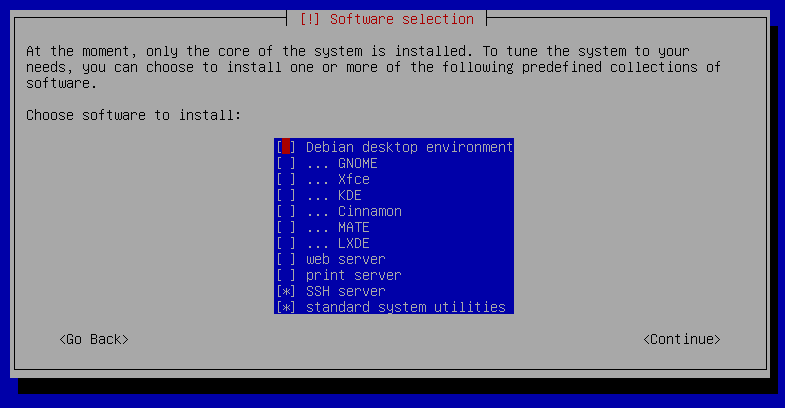
When you install Debian, you will eventually reach a "Software selection" dialog that contains a list of checkboxes for selecting the software you want to install initially. Here, the "Debian desktop environment" checkbox is already checked. If you uncheck this checkbox and leave all other desktop environment checkboxes (GNOME, Xfce, etc.) unchecked, this results in a GUI-less installation:
The installed packages for Apache web server, PHP, and MariaDB already come with configuration files. It is recommended to store custom settings in separate files rather than modifying the existing configuration files. With each package upgrade, any divergent settings would be flagged or overwritten. The default configuration settings are supplemented or overridden by the custom ones.
The memory_limit must be increased if needed, e.g., for very large reports or extensive documents. The value (in seconds) of session.gc_maxlifetime should be greater than or equal to the Session Timeout in the system settings of i-doit. The date.timezone parameter should be adjusted to the local time zone (see list of supported time zones).
Then the required PHP modules are activated and the Apache web server is restarted:
<VirtualHost*:80>
ServerAdmini-doit@example.net
DocumentRoot/var/www/html/
DirectoryIndexindex.php
DocumentRoot/var/www/html
<Directory/var/www/html>
## See https://httpd.apache.org/docs/2.2/mod/core.html#allowoverrideAllowOverrideNone
## Apache Web server configuration file for i-doit#### This file requires:#### - Apache HTTPD >= 2.4 with enabled modules:## - rewrite## - expires## - headers## - authz_core#### For performance and security reasons we put these settings## directly into the VirtualHost configuration and explicitly set## "AllowOverride None". After each i-doit update check if the .htaccess file, in the i-doit directory,## has changed and add the changes in the VirtualHost configuration.#### See the i-doit Knowledge Base for more details:## <https://kb.i-doit.com/>## Disable directory indexes:Options-Indexes+SymLinksIfOwnerMatch
<IfModulemod_authz_core.c>
RewriteCond%{REQUEST_METHOD}=GET
RewriteRule"^$""/index.php"## Deny access to meta files:<Files"*.yml">
Requirealldenied
</Files>
## Deny access to hidden files:<FilesMatch"^\.">
Requirealldenied
</FilesMatch>
## Deny access to bash scripts:<FilesMatch"^(controller|.*\.sh)$">
Requirealldenied
</FilesMatch>
## Deny access to all PHP files…<Files"*.php">
Requirealldenied
</Files>
## Deny access to wrongly created config backup files like ...inc.php.0123123 instead of ...inc.012341.php<FilesMatch"\.php\.\d+$">
Requirealldenied
</FilesMatch>
## …except some PHP files in root directory:<FilesMatch"^(index\.php|controller\.php|proxy\.php)$">
<IfModulemod_auth_kerb.c>
Requirevalid-user
</IfModule>
<IfModule!mod_auth_kerb.c>
Requireallgranted
</IfModule>
</FilesMatch>
## …except some PHP files in src/:<Files"jsonrpc.php">
Requireallgranted
</Files>
## …except some PHP files in src/tools/php/:<FilesMatch"^(rt\.php|barcode_window\.php|barcode\.php)$">
Requireallgranted
</FilesMatch>
## …except some PHP files in src/tools/php/qr/:<FilesMatch"^(qr\.php|qr_img\.php)$">
Requireallgranted
</FilesMatch>
## …except some PHP files in src/tools/js/:<FilesMatch"^js\.php$">
Requireallgranted
</FilesMatch>
</IfModule>
## Deny access to some directories:<IfModulemod_alias.c>
RedirectMatch403/imports/.*$
RedirectMatch403/log/.*$
RedirectMatch403/temp/.*(?<!\.(css|xsl))$
RedirectMatch403/upload/files/.*$
RedirectMatch403/upload/images/.*$
RedirectMatch403/vendor/.*$
</IfModule>
## Cache static files:<IfModulemod_expires.c>
ExpiresActiveOn
# A2592000 = 30 daysExpiresByTypeimage/svg+xmlA2592000
ExpiresByTypeimage/gifA2592000
ExpiresByTypeimage/pngA2592000
ExpiresByTypeimage/jpgA2592000
ExpiresByTypeimage/jpegA2592000
ExpiresByTypeimage/icoA2592000
ExpiresByTypetext/cssA2592000
ExpiresByTypetext/javascriptA2592000
ExpiresByTypeimage/x-icon"access 1 year"ExpiresDefault"access 2 week"<IfModulemod_headers.c>
HeaderappendCache-Control"public"</IfModule>
</IfModule>
## Pretty URLs:<IfModulemod_rewrite.c>
RewriteEngineOn
RewriteRulefavicon\.ico$images/favicon.ico[L]RewriteCond%{REQUEST_FILENAME}!-l
RewriteCond%{REQUEST_FILENAME}!-f
RewriteCond%{REQUEST_FILENAME}!-d
RewriteRule.*index.php[L,QSA]</IfModule>
## Deny access to all ini files…<Files"*.ini">
Requirealldenied
</Files>
</Directory>
TimeOut600ProxyTimeout600<FilesMatch"\\.php$">
<If"-f %{REQUEST_FILENAME}">
SetHandler"proxy:unix:/var/run/php/php8.4-fpm.sock|fcgi://localhost"</If>
</FilesMatch>
LogLevelwarn
ErrorLog${APACHE_LOG_DIR}/error.log
CustomLog${APACHE_LOG_DIR}/access.logcombined
</VirtualHost>
i-doit ships custom Apache settings in files named .htaccess. These must be reviewed after each update and updated in the VirtualHost configuration. The .htaccess file is located in the i-doit directory, e.g., /var/www/html/.htaccess.
In the next step, the new VHost and the required Apache module rewrite are activated, and the Apache web server is restarted:
To ensure MariaDB delivers good performance and can be operated securely, you should not only follow our guide but also inform yourself further. Starting with a secure installation where the recommendations should be followed. Additionally, the root user should receive a secure password.
1
sudomariadb-secure-installation
The InnoDB shutdown mode still needs to be changed. The value 0 causes a full purge and change buffer merge to be performed before MariaDB shuts down:
1
mysql-uroot-p-e"SET GLOBAL innodb_fast_shutdown = 0"
A new file is created for the custom configuration settings and our default configuration is inserted:
1
sudonano/etc/mysql/mariadb.conf.d/99-i-doit.cnf
This file contains the new configuration settings. For optimal performance, these settings should be adjusted to the (virtual) hardware. For optimal settings, please refer to mariadb.com
[mysqld]# This is the number 1 setting to look at for any performance optimization# It is where the data and indexes are cached: having it as large as possible will# ensure MySQL uses memory and not disks for most read operations.# See https://mariadb.com/kb/en/innodb-buffer-pool/# Typical values are 1G (1-2GB RAM), 5-6G (8GB RAM), 20-25G (32GB RAM), 100-120G (128GB RAM).innodb_buffer_pool_size=1G# Redo log file size, the higher the better.# MySQL/MariaDB writes one of these log files in a default installation.innodb_log_file_size=512Minnodb_sort_buffer_size=64Msort_buffer_size=262144# defaultjoin_buffer_size=262144# defaultmax_allowed_packet=128Mmax_heap_table_size=32Mquery_cache_min_res_unit=4096query_cache_type=1query_cache_limit=5Mquery_cache_size=80Mtmp_table_size=32Mmax_connections=200innodb_file_per_table=1# Disable this (= 0) if you have slow hard disksinnodb_flush_log_at_trx_commit=1innodb_flush_method=O_DIRECTinnodb_lru_scan_depth=2048table_definition_cache=1024table_open_cache=2048innodb_stats_on_metadata=0# The maximum number of instances is defined by the table_open_cache_instances system variable.# The default value of the table_open_cache_instances system variable is 8, which is expected to handle up to 100 CPU cores.# If your system is larger than this, then you may benefit from increasing the value of this system variable.table_open_cache_instances=8sql-mode=""