LDAP-directory/Active Directory (AD)
Please create a complete backup before making any changes to an interface/import. If the result is not satisfactory, the backup can then be restored
The LDAP/AD interface connects i-doit to your central directory. Users log in with their familiar credentials, and you can automatically synchronize persons and person groups.
A practical example can be found on our Blog
Prerequisites#
i-doit supports the following directory services:
- OpenLDAP
- Microsoft Active Directory (AD)
- Novel eDirectory (formerly Directory Services)
The PHP extension php_ldap must be installed and enabled. If you have followed the installation instructions, the extension is already present on your system.
SELinux
If you are using SELinux, you must explicitly allow LDAP connections: setsebool -P httpd_can_connect_ldap on (the -P flag makes the setting permanent). Check the status with getsebool -a | grep httpd.
Required rights for the LDAP sync#
A user for the ldap-sync command requires the following minimum permissions:
1. Administration (command execute)
- Condition Commands and
Allrights for the parameterSyncCommand.
2. CMDB (edit objects & groups)
- Condition category in object type "Persons" and
Allrights for the categoryPersons - person group membership.
Subsequent installation on Debian GNU/Linux#
1 2 | |
Subsequent installation on Windows#
Edit the file php.ini (typically located at C:\xampp\php\php.ini). Enable the extension php_ldap by removing the semicolon at the beginning of the line.
From the line
1 | |
becomes
1 | |
Depending on the version, it may be necessary to copy the files ssleay32.dll and libeay32.dll (usually located under C:\xampp\apache\bin\) into the php\ directory. Then restart the Apache web server.
Configuration#
The configuration is located in i-doit under Administration → Import and Interfaces → LDAP.
Server#
Under Administration → Import and Interfaces → LDAP → Server you configure one or more LDAP servers. During login, i-doit queries all configured servers one after another until a successful authentication occurs. With multiple tenants, all databases are offered where the query returns a positive result.
LDAP Connection for Lookups (read-only)#
| Field name | Content |
|---|---|
| Active | Should the server be queried during login? |
| Directory | Required field: What type of directory is being queried? |
| LDAP Version | Which version of the directory is in use? (default: 3) |
| Enable LDAP Paging | Should the maximum number of search results be enabled/overridden? If so, the results are transmitted packet by packet. In an LDAP search process, you must always consider that the LDAP server may impose an upper limit on results returned per query. For example, you search for all user objects in an entire OU structure but only receive 500 users as a result, even though well over 2000 users exist on the server. |
| LDAP Page Limit | How many results should be returned per "package"? |
| IP / Hostname | Required field: The IP or hostname of the server |
| Port | Required field: Through which port is the query performed? (default: 389) |
| TLS | Should the query be encrypted? On Debian-based operating systems the Root CA certificate is copied to the directory /usr/local/share/ca-certificates/ and subsequently enabled with sudo update-ca-certificates. |
| TLS Certificate | Here the certificate is selected. If none has been uploaded yet, it can be uploaded directly. |
| TLS Certificate Check Strategy | Allow: The peer certificate is requested. If no certificate is provided, the session continues normally. If an invalid certificate is provided, it is ignored and the session continues normally. Demand: The peer certificate is requested. If no certificate is provided or an invalid certificate is provided, the session is immediately terminated. |
| Admin username (DN) | Required field: The path to the user object that has read access to the directory. (Example: CN=idoit,OU=tree,DC=synetics,DC=int) |
| Password | Required field: The password of the specified user |
| Use admin user for all read queries | When the option "Use admin user for all read queries" is enabled, every LDAP server query is verified using the administrator account from the LDAP server configuration |
| Time limit | Limit for the maximum duration of the query. (default: 30) |
Known solutions for TLS connection problems can be found at LDAP via TLS
LDAP parameters for i-doit login#
These parameters determine where i-doit searches for users in the directory.
| Field name | Content |
|---|---|
| Unique identifier | During AD synchronization, it can happen that changed records are no longer synchronized correctly due to a changed name (e.g. marriage). The "old" record is then archived and a new one is imported. Therefore, a different attribute can be selected as the unique identifier. See Attribute extension |
| Filter | The filter is automatically filled by the values defined in the section below. It is also possible to edit the filter manually. To do so, click the Edit manually button. |
| Search for users in (OU) | Required field: The path to the organizational unit where the users are stored in the directory. (Example: OU=tree,DC=synetics,DC=int) |
| Recursive search | When recursive search is enabled, the directories below the specified organizational unit are also searched. For large directories this is not recommended and should be avoided by creating multiple servers. |
You can further refine the filter. With a single filter line, the additional options have no effect yet. Only when you extend the query via Add filter do they take effect.
Append to last filter:
1 | |
Append as new filter:
1 | |
Form new term:
1 | |
In the lower section of the page you can test the configuration. On success, the following message appears:
1 2 | |
If the error message is not informative enough, increase the debug level. This causes i-doit to write more detailed output to the Apache error log. On Debian-based systems you can find it at /var/log/apache2/error.log.
Identifying objects#
Without additional settings (e.g. Unique identifier), i-doit identifies objects based on the Login attribute from the category Persons > Login.
Directories#
Under Administration → Import and Interfaces → LDAP → Directories you set up the attribute mapping. During login, i-doit queries basic information about the user and stores it in the person object. Select the applicable directory and adjust the assignment as needed. As a rule, the fields are already correctly pre-filled.
Import custom LDAP attributes#
You can also import custom LDAP attributes into the master data. Configure additional fields under Administration → Import and Interfaces → LDAP → Attribute extension. Once you have defined a name, the field appears in the master data and is populated during sync via the associated key.
Regular synchronization#
You have already completed the basic configuration in the previous steps. Now set up the appropriate i-doit console utility command to execute the synchronization on a regular basis. Optionally, configure additional fields to be synchronized.
Extended configuration#
An example can be found here. This file can be extended with login credentials, tenant, and additional options. For the ldap-sync command to consider it, specify it via the parameter -c /path/. Additional information can be found at the i-doit console utility.
| Parameter | Purpose |
|---|---|
| import_rooms | When set to true, rooms are also created during synchronization (default: false) |
| defaultCompany | This causes users added through LDAP synchronization to be automatically assigned to the configured organization. (default: empty) Example: defaultCompany='i-doit' |
| deletedUsersBehaviour | Can be set to archive, delete, or disable_login to archive or delete users who are no longer found during synchronization. An archived/deleted user can no longer log in to i-doit. deletedUserBehavior=archive sets the user status to archived deletedUserBehavior=delete sets the user status to deleted deletedUserBehavior=disable_login sets the user status to normal and disables login (default: archive) Example: deletedUsersBehaviour=archive |
| disabledUsersBehaviour | Can be set to archive, delete, or disable_login to archive or delete users whose account is disabled in the directory. Alternatively, only the login for those users can be disabled. Only evaluated for Active Directory, since OpenLDAP and NDS have no comparable flag. (default: archive) Example: disabledUsersBehaviour=archive |
| rooms | As shown in the example, a fixed assignment of users to a room can be defined here, which is applied during synchronization. The assignment is realized via the contact assignment without a role. Example: rooms["Room B"] = ["Person A", "Person C", "Person D"] |
| attributes | This maps the respective fields from the directory to attributes in i-doit. These supplement the assigned attributes from the upper part of the guide. Example: attributes[department]=department |
| autoReactivateUsers | Only relevant for Novel Directory Services (NDS) and OpenLDAP. This causes all users to be re-enabled first during synchronization and then disabled again according to the regular principle, if applicable. Example: autoReactivateUsers=false |
| ignoreUsersWithAttributes | This function helps prevent synchronization of unwanted directory objects. The ignoreFunction is run against every attribute listed here. The user is skipped only if it applies to all of them. Example: ignoreUsersWithAttributes[] = "samaccountname" |
| ignoreFunction | This can be any function name callable via call_user_func or the defined functions. Defined functions: empty !empty isset !isset Example: ignoreFunction=empty |
| syncEmptyAttributes | If values have been deleted/cleared from fields in AD, they are adopted in i-doit syncEmptyAttributes=true |
Automatic assignment of persons to person groups#
The automatic assignment ensures that users receive the permissions of their person group automatically after login.
To set up the assignment:
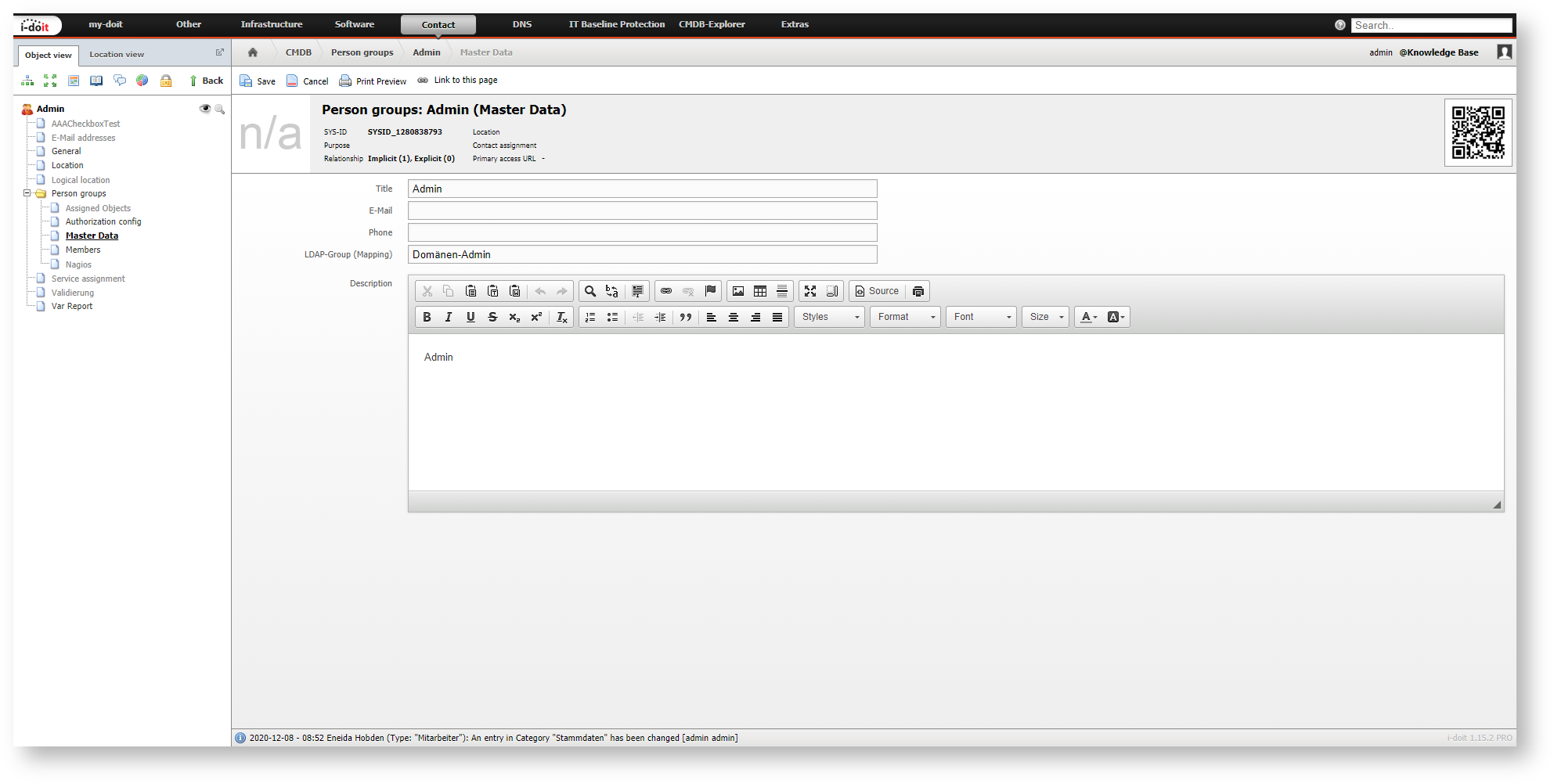
- Open the master data of a person group in i-doit.
- Enter the name of the corresponding LDAP/AD group in the LDAP Group (Mapping) attribute.
During login or synchronization, i-doit compares the user's group memberships in the directory with the configured mappings. If they match, the person group is automatically assigned.
memberOf with OpenLDAP
The automatic assignment relies on the LDAP query that determines which groups a user belongs to. The memberOf attribute plays an important role here. This attribute must be available as an overlay, which is not the case in many default installations of OpenLDAP. Good articles on the required configuration can be found here and here.
Synchronizing persons and person groups#
Since version 1.15, i-doit synchronizes persons and person groups from LDAP/AD. In this process, persons are automatically assigned to the groups they belong to in LDAP, provided those groups are captured by the configured filter.
A detailed guide can be found in the article Import users and groups from AD/LDAP.
The executing user requires supervisor permissions on the categories Group membership and Person groups > Members as well as on the object types Persons and Person groups.

Logging#
In the log/ directory of your i-doit installation you will find the log file ldap_YYYY-MM-DD.log. Logging is configured in the Admin Center or via the Expert settings.
Executing the ldap-sync#
The ldap-sync is executed via the command line of the server. First familiarize yourself with the i-doit console utility. For a simple synchronization without extended configuration, use the ldap-sync command.
Example usage from the i-doit directory
1 | |